

Key Takeaways
- The Revenue Cycle Modeler (RCM) is a visual model of your lead lifecycle that generates the data behind Marketo’s Advanced BI Analytics reporting.
- It does not replace your Lead Lifecycle. The RCM can only move people between stages — it can’t take actions like stamping data or sending alerts.
- The two main reasons to use it: funnel analytics in Advanced BI Analytics, and offline conversions that let Google Ads and Facebook optimize bidding.
- Not everyone needs it. Plenty of teams run perfectly well without ever activating the RCM.
The Revenue Cycle Modeler (RCM) in Marketo Engage is a visual model of your lead lifecycle that powers Marketo’s funnel reporting. If you’ve worked in Marketo Engage (which we’ll simply refer to as Marketo or MKTO from here on out), you’ve probably encountered the Revenue Cycle Modeler (RCM) in some way, shape, or form. But one thing we’ve learned is that many people don’t really know what the RCM is, or how to actually use it. So, we’ve written this article to demystify this feature and help users figure out what this thing is and how they should be using it.
To understand what it is, it helps to go back a bit. The RCM shipped as part of Marketo’s advanced reporting package — originally the Revenue Cycle Explorer, later renamed Revenue Cycle Analytics, and now Advanced BI Analytics. That package lets you custom-build reports and dashboards from data points inside Marketo, and one of its most powerful features is deep-diving into your funnel: conversion rates, velocity, aging, in-flow, out-flow, and current volumes across every stage. The RCM is what creates and powers all of that data.
You’ll find the RCM in the Analytics section of your MKTO instance. When you build one, it looks like the template example below (this is the sample model Marketo ships as a starting point).
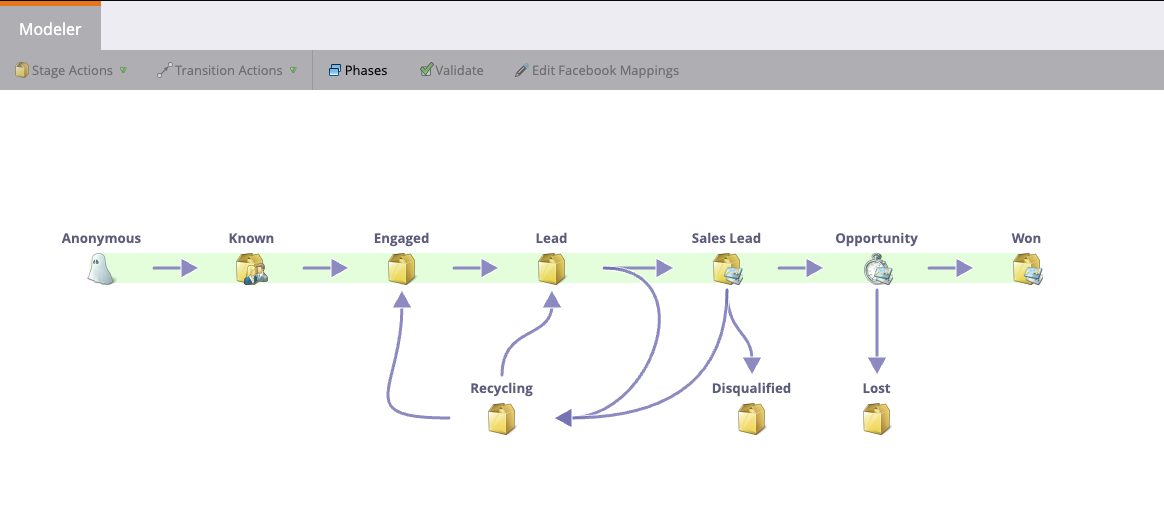
It shows a visual representation of your lead lifecycle, with stages and arrows that govern the transitions between them. Once it’s activated, people flow through the stages based on the transition rules in the arrows — and the goal is to create a body of data the Advanced BI Analytics package can then report on.
Now, this is where the questions start popping up. So, let’s tackle these one at a time.
Frequently asked questions about the Marketo Revenue Cycle Modeler
Does the Revenue Cycle Modeler replace the Lead Lifecycle?
No. The RCM does not replace your Lead Lifecycle, and in most cases it can’t. The RCM is incapable of taking any action other than moving someone into a stage. So if your Lead Lifecycle takes actions — stamping data points, setting timestamps, sending alerts, creating Interesting Moments, or anything else — the RCM not only doesn’t replace it, it can’t. The vast majority of Lead Lifecycles take actions, which means you don’t simply swap in the RCM.
Why would I use the Revenue Cycle Modeler?
There are two main reasons to use the RCM, plus a few minor ones.
- Funnel reporting. If you want to leverage Advanced BI Analytics to track and measure your funnel, you’ll want the RCM. The data it creates works better for this than the Lead Lifecycle alone.
- Ad offline conversions. Google Ads and Facebook have integrations with Marketo that let you create offline conversions for milestones like MQL attainment or conversion to Opportunity. Google and Facebook use those offline conversions to automatically optimize your bidding strategies — and the RCM is the only place you can configure them; there’s no other way to set them up with the standard integrations (see Adobe’s Marketo documentation on offline conversions). So if you want to optimize bidding with offline conversions, you need the RCM.
These are the two biggest reasons. There are a couple of other reasons, but they’re very minor.
How do I set up the Revenue Cycle Modeler?
Setup mirrors your Lead Lifecycle, and the arrows are the hard part. First, your RCM should have the exact same stages as your Lead Lifecycle. Where it gets tricky is configuring the arrows, because the arrows govern how people move between stages. If an arrow exists, someone can make that transition; if it doesn’t, nobody can. So you need an arrow for every potential transition — and since buying journeys aren’t linear, you’re going to need a lot of them. Within each arrow, you configure exactly what moves someone from Stage X to Stage Y using triggers. Most will look familiar, since they’re very similar to the triggers in a Smart Campaign.
Do I need to use SLA stages or Gate stages?
No, you don’t need SLA or Gate stages — and if you’re setting up the RCM for the first time, it’s usually better to skip them. You may have a use case for them, but typically they overcomplicate things and it’s easy to make a mistake. Start simple, then add complexity where it makes sense. Remember: simplicity scales, complexity fails.
How do I make sure the RCM is working and people are in the correct stages?
Validate the RCM by comparing its stage counts side-by-side against your Lead Lifecycle. It’s a somewhat manual process. Run smart lists that show how many people are in (or were in) each stage over a given time frame — do it for both the Lead Lifecycle and the RCM — then put them side-by-side in Excel or Google Sheets to see the difference. Even when everything is working, you’ll see some delta; the numbers never line up perfectly. The smaller the delta, the better. A large delta is the primary indicator that something is amiss.
Is the Lead Lifecycle number or the RCM number more accurate?
Attributa finds the Lead Lifecycle is usually the more accurate number, though not always. The Lead Lifecycle doesn’t rely on the arrows the RCM does. If one arrow has an error, it can cause a cascading effect — a person gets stuck and never moves — which skews the RCM counts. That’s why the Lead Lifecycle is typically more accurate. But it’s not a hard rule, so you’ll have to manually review examples to confirm which is right in your instance.
Conclusion
Not everyone needs the Revenue Cycle Modeler. Attributa works with plenty of companies that either don’t use it, or set it up and then do nothing with it — it just sits there — and they’re doing just fine. We also have clients getting real value from it. It all depends on the needs of each organization.
Hopefully this article helps you understand what the RCM does, so you can decide whether it’s right for you. If you have questions about the tool — whether you should be using it, or how to set it up — reach out to us at info@attributa.io. We’d be glad to help you think it through.
